Secure Chat FYEO (For Your Eyes Only) Mode
Secure Chat introduces the FYEO (For Your Eyes Only) mode, designed to provide enhanced privacy and control over your messages. This powerful feature enables you to send and receive messages that automatically self-destruct after a specified period, ensuring your sensitive conversations remain confidential. In this guide, you'll discover how to use the FYEO mode to its fullest potential.
Step-by-Step Guide:
Step 1: Sending FYEO Message
When composing a message, tap on the FYEO (For Your Eyes Only) button, typically represented by an eye icon or a similar visual cue. You can find the button on the bottom left corner in the Chat, to configure the feature, please click on it.
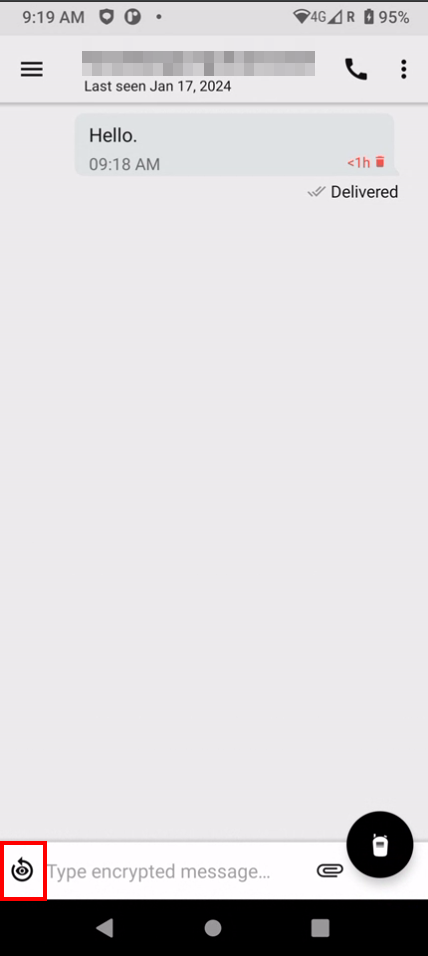
Step 2: Set Expiry Time
Select the desired expiration time for the message. This determines how long the recipient can view the message before it self-destructs. You can choose from various predefined time intervals, such as a few seconds to several minutes. The predefined time intervals go from 15 sec up to 1 hour. You can see the Timer on the right side on the slider. Once you are satisfied with your selection, press Set to activate it.
Step 3: Compose and Send
Compose your message as usual and send it. The recipient will receive the FYEO message with the specified expiration time.
Step 4: Receiving FYEO Message
When you receive an FYEO message, open the chat fragment. The countdown timer will start, indicating the remaining time before the message self-destructs.
After 1 hour the messages will be deleted and the conversation will be shown as new.
Step 5: Viewing and Interacting
Read the FYEO message within the designated time frame. You can also perform various actions on the message, such as copying, forwarding, editing, and saving to Vault. For this I will send an 1 hour message. While the message is visible for you it will be visible for everyone who you share it with for the same time.
Receiver Side: They can only delete the message early.
Step 6: Automatic Deletion
Once the set time expires, the FYEO message will be automatically deleted from both the sender's and recipient's chat fragments, leaving no trace behind.
FAQ:
FYEO Message Preview?
If you're on the Recent Chats screen and receive an FYEO message, you'll see a badge indicating the presence of a new message. The message's expiration countdown won't start until you open the chat fragment.
Can of FYEO and TTL coexist?
If you receive both an FYEO and TTL (Time To Live) message, the FYEO message will take priority. However, if the TTL time elapses before the FYEO message expires, the TTL deletion will occur.
How do messages act in Background and Offline Mode?
Messages in FYEO mode will not self-destruct while you're in the background, offline, or navigating through other app screens.
Will the timer of FYEO Message tick while I am Offline?
If you receive an FYEO message while offline, the message expiration won't initiate until you're back online.
How does the Global and Individual Settings work?
FYEO settings can be governed by SAS policies or individually customized from the chat fragment or global settings, giving you granular control.
Can you Edit or Delete FYEO Messages
You can edit or delete an FYEO message, but the message's expiration countdown will continue regardless of these actions.
Can you Forward FYEO Messages?
Forwarding an FYEO message removes the FYEO properties and sends a standard message without expiration.
Can I Import and Save FYEO Files
FYEO mode extends to files imported from Vault, ensuring their confidentiality. Saving a file to Vault without FYEO properties is also supported.
With FYEO mode, Secure Chat empowers you to share sensitive information with confidence. This feature provides unparalleled privacy and control, allowing you to communicate securely and efficiently.
FYEO messages serve to enhance privacy, security, and spontaneity in communication. They are used to share sensitive information temporarily, reduce digital footprints, and encourage casual, temporary exchanges while minimizing the risk of unauthorized access or data accumulation.
Related Articles
How to Forward Messages in Secure Chat
Introduction: Forwarding messages in Secure Chat allows you to easily share important information with other contacts. Whether you want to share a funny conversation or important details, this guide will walk you through the steps to successfully ...How to Search for Messages in Secure Chat Conversations
Searching for specific messages within your chat conversations can be incredibly useful when you're trying to find important information quickly. Secure Chat offers a robust search feature that enables you to effortlessly locate messages containing ...How to Make a Video Call in Secure Chat
Introduction: Crypto Chat Chat allows you to make encrypted video calls, enhancing your communication experience with face-to-face conversations. This guide will walk you through the steps to make a video call and use various features during the call ...How to Delete a Chat in Secure Chat
Introduction: In Secure Chat, you have the freedom to manage your conversations as you see fit. If you wish to clear a chat and remove it from your chat list, this guide will walk you through the simple steps of deleting a chat. Keep your chat list ...Typing indicator in Secure Chat
Secure Chat introduces a helpful feature called Typing Indicators that allows you to know when your contact is composing a message in a chat conversation. This real-time awareness can enhance your communication experience and keep you updated on your ...